ByteGeist Windows Server / AD Homelab
A multi-VM Windows Server 2022 Active Directory environment I run on VMware Workstation Pro to practice day-to-day Help Desk and Junior SysAdmin work: domain services, DNS, OU and group design, SMB file sharing with role-based access, PowerShell troubleshooting, and the kind of break/fix that shows up in interview questions.
Everything on this page was captured from the live lab on 2026-10-03. No fabricated screenshots, no stock art.
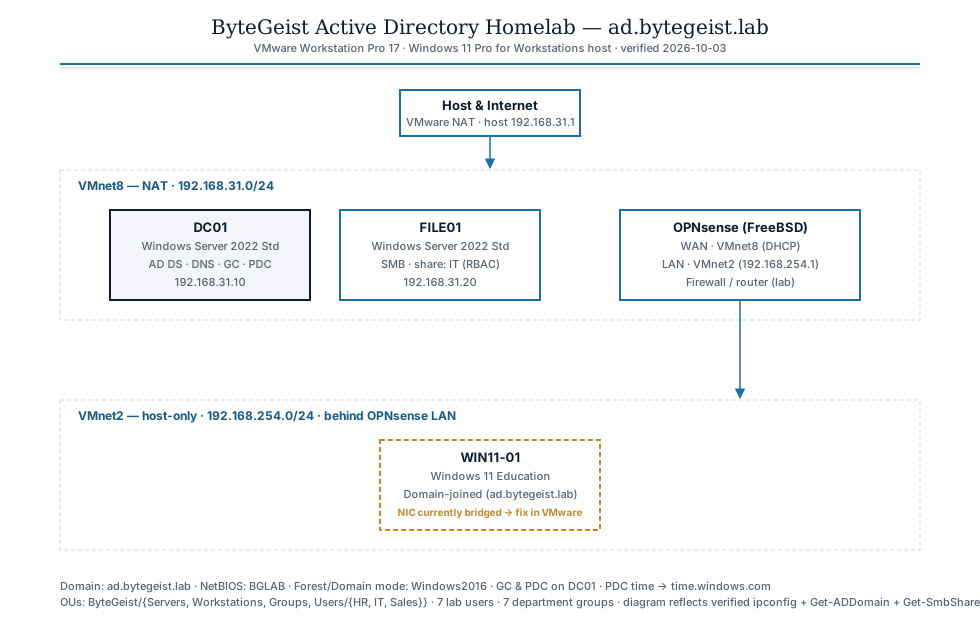
ipconfig, Get-ADDomain, Get-SmbShare, and VMware vmnetdhcp.conf.Systems
Four VMs, verified fromvmrun and in-guest audits
| System | Operating System | Role | Address | Purpose |
|---|---|---|---|---|
| DC01 | Windows Server 2022 Standard | Domain Controller | 192.168.31.10 | AD DS, DNS, PDC Emulator, Schema & Domain Naming Master, Global Catalog |
| FILE01 | Windows Server 2022 Standard | Member server | 192.168.31.20 | SMB file services; IT departmental share |
| WIN11-01 | Windows 11 Education | Domain client | NIC change pending | Domain-joined workstation |
| OPNSENSE | OPNsense (FreeBSD) | Firewall / router | VMnet8 ↔ VMnet2 | Segmenting server (VMnet8) and client (VMnet2) networks |
Active Directory & DNS
Captured fromGet-ADDomain / Get-ADForest on DC01
Forest & Domain
- Forest / Domain
ad.bytegeist.lab - NetBIOS
BGLAB - Forest mode
Windows2016Forest - Domain mode
Windows2016Domain - FSMO rolesall held by
DC01 - Global Catalog
DC01 - DNS zones
ad.bytegeist.lab,_msdcs.ad.bytegeist.lab, 3 reverse - PDC time source
time.windows.com(fixed fromLocal CMOS)
Organizational Units
ad.bytegeist.lab/
├── ByteGeist/
│   ├── Groups
│   ├── Servers
│   ├── Workstations
│   └── Users/
│       ├── HR
│       ├── IT
│       └── Sales
└── Domain Controllers
Lab-created groups
Accounting · Help Desk · HR Employees · IT Employees · Management · Sales Employees · VPN Users
File services & permissions
FILE01 —Get-SmbShareAccess and Get-Acl
FILE01 publishes one departmental share and uses the IT Employees
security group to grant access — accounts never get rights directly on
resources, groups do. The share-level cap is Change; NTFS
grants Modify explicitly to BGLAB\IT Employees.
Share IT at C:\Shares\IT
Share-level ACL
| Account | Type | Right |
|---|---|---|
BGLAB\Domain Admins | Allow | Full |
BGLAB\IT Employees | Allow | Change |
NTFS ACL
| Identity | Rights | Inherited |
|---|---|---|
BGLAB\IT Employees | Modify, Synchronize | No (explicit) |
NT AUTHORITY\SYSTEM | FullControl | Yes |
BUILTIN\Administrators | FullControl | Yes |
BUILTIN\Users | ReadAndExecute + CreateFiles + AppendData | Yes |
CREATOR OWNER | Full on child objects | Yes |
How it was verified
PS> Invoke-Command FILE01 {
      Get-SmbShare |
        Where-Object Name -NotIn 'ADMIN$','C$','IPC$' |
        Get-SmbShareAccess
      (Get-Acl C:\Shares\IT).Access
    }
Run from DC01 as a Domain Admin via WinRM, output captured to a transcript on the host (not inside the VM) so no sensitive data lives on a shared share.
Validation & fixes applied
Real problems found & resolved during the auditProblem: PDC was using the local CMOS clock
The PDC Emulator is the authoritative time source for a Windows forest.
If it drifts, Kerberos tickets outside the 5-minute skew window fail —
a classic "I can't log in" root cause. w32tm /query /source
returned Local CMOS Clock.
w32tm /config /manualpeerlist:"time.windows.com,0x9 pool.ntp.org,0x9 time.nist.gov,0x9" `
      /syncfromflags:manual /reliable:yes /update
Restart-Service W32Time
w32tm /resync /rediscover
Verified: Source: time.windows.com,0x9, Stratum 5.
Problem: stale dcdiag SystemLog failure
A past unexpected shutdown left an entry that dcdiag flagged on
every run. Cleared the System log and re-ran dcdiag /q.
wevtutil cl System
dcdiag /q
Verified: dcdiag /q now silent (clean).
Pending (user-side VMware GUI)
WIN11-01's vmx is encrypted and its NIC is bridged to the physical LAN
(192.168.1.132), so it currently can't reach DC01 (192.168.31.10). Fix is a
VMware-side NIC change plus a Test-ComputerSecureChannel -Repair.
Documented honestly rather than papered over.
Skills demonstrated
Why this project matters for IT roles- Windows Server 2022 — installed, promoted to a DC, operate day-to-day.
- Active Directory — domain / forest design, OUs, users and groups, FSMO awareness, Global Catalog.
- DNS — AD-integrated primary zones, reverse zones, understanding why the client's DNS must point at the DC.
- SMB & NTFS — share creation, share-level vs. NTFS permissions, role-based access through groups.
- PowerShell —
Get-AD*,Invoke-Command,Get-SmbShareAccess,Get-Acl,w32tm,Test-ComputerSecureChannel. - Troubleshooting — recognizing Local CMOS Clock as a future Kerberos failure; recognizing an Access Denied on WinRM as "not in the server's local Administrators."
- Virtualization & networking — VMware Workstation Pro, VMnet subnetting, OPNsense placement, bridged vs. NAT NIC implications.
- Honest audit documentation — the
WIN11-01 pendingcallout stays visible, with the exact fix listed.
Want to see the full audit log?
Phases, verified command output, problem-and-fix table, security notes.