 Keith Casko
64 lines
4.0 KiB
XML
64 lines
4.0 KiB
XML


<?xml version="1.0" encoding="UTF-8"?>
|
|
<svg xmlns="http://www.w3.org/2000/svg" viewBox="0 0 980 620" font-family="Segoe UI, Arial, sans-serif" font-size="13" fill="#d9e4ee">
|
|
<defs>
|
|
<marker id="arrow" viewBox="0 0 10 10" refX="9" refY="5" markerWidth="7" markerHeight="7" orient="auto-start-reverse">
|
|
<path d="M0,0 L10,5 L0,10 z" fill="#1a6fa5"/>
|
|
</marker>
|
|
<style>
|
|
.title { font-family: Georgia, serif; font-size: 20px; fill: #f2f6fa; }
|
|
.caption { font-size: 11px; fill: #aebdca; }
|
|
.box { fill: #17314a; stroke: #4b91c2; stroke-width: 2; }
|
|
.box-dc { fill: #0f2438; stroke: #7aa6c7; stroke-width: 2; }
|
|
.box-net { fill: #10283d; stroke: #4d657a; stroke-width: 1; stroke-dasharray: 4 3; }
|
|
.hdr { font-weight: bold; fill: #f4f7fa; }
|
|
.role { font-size: 11px; fill: #c0ccd7; }
|
|
.link { stroke: #1a6fa5; stroke-width: 1.5; fill: none; }
|
|
.net-label { font-size: 12px; fill: #7fc0ea; font-weight: bold; }
|
|
</style>
|
|
</defs>
|
|
|
|
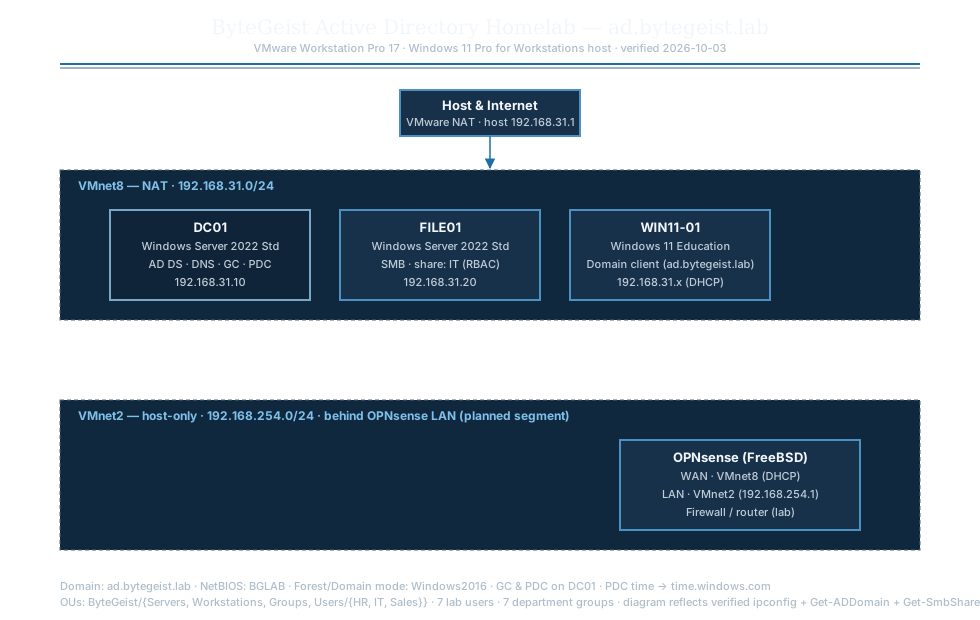
<text x="490" y="34" class="title" text-anchor="middle">ByteGeist Active Directory Homelab — ad.bytegeist.lab</text>
|
|
<text x="490" y="52" class="caption" text-anchor="middle">VMware Workstation Pro 17 · Windows 11 Pro for Workstations host · verified 2026-10-03</text>
|
|
<line x1="60" y1="64" x2="920" y2="64" stroke="#1a6fa5" stroke-width="2"/>
|
|
<line x1="60" y1="68" x2="920" y2="68" stroke="#4d657a" stroke-width="1"/>
|
|
|
|
<rect x="400" y="90" width="180" height="46" class="box"/>
|
|
<text x="490" y="110" class="hdr" text-anchor="middle">Host & Internet</text>
|
|
<text x="490" y="126" class="role" text-anchor="middle">VMware NAT · host 192.168.31.1</text>
|
|
|
|
<rect x="60" y="170" width="860" height="150" class="box-net"/>
|
|
<text x="78" y="190" class="net-label">VMnet8 — NAT · 192.168.31.0/24</text>
|
|
|
|
<rect x="110" y="210" width="200" height="90" class="box-dc"/>
|
|
<text x="210" y="232" class="hdr" text-anchor="middle">DC01</text>
|
|
<text x="210" y="250" class="role" text-anchor="middle">Windows Server 2022 Std</text>
|
|
<text x="210" y="268" class="role" text-anchor="middle">AD DS · DNS · GC · PDC</text>
|
|
<text x="210" y="286" class="role" text-anchor="middle">192.168.31.10</text>
|
|
|
|
<rect x="340" y="210" width="200" height="90" class="box"/>
|
|
<text x="440" y="232" class="hdr" text-anchor="middle">FILE01</text>
|
|
<text x="440" y="250" class="role" text-anchor="middle">Windows Server 2022 Std</text>
|
|
<text x="440" y="268" class="role" text-anchor="middle">SMB · share: IT (RBAC)</text>
|
|
<text x="440" y="286" class="role" text-anchor="middle">192.168.31.20</text>
|
|
|
|
<rect x="570" y="210" width="200" height="90" class="box"/>
|
|
<text x="670" y="232" class="hdr" text-anchor="middle">WIN11-01</text>
|
|
<text x="670" y="250" class="role" text-anchor="middle">Windows 11 Education</text>
|
|
<text x="670" y="268" class="role" text-anchor="middle">Domain client (ad.bytegeist.lab)</text>
|
|
<text x="670" y="286" class="role" text-anchor="middle">192.168.31.x (DHCP)</text>
|
|
|
|
<line class="link" x1="490" y1="136" x2="490" y2="168" marker-end="url(#arrow)"/>
|
|
|
|
<rect x="60" y="400" width="860" height="150" class="box-net"/>
|
|
<text x="78" y="420" class="net-label">VMnet2 — host-only · 192.168.254.0/24 · behind OPNsense LAN (planned segment)</text>
|
|
|
|
<rect x="620" y="440" width="240" height="90" class="box"/>
|
|
<text x="740" y="462" class="hdr" text-anchor="middle">OPNsense (FreeBSD)</text>
|
|
<text x="740" y="480" class="role" text-anchor="middle">WAN · VMnet8 (DHCP)</text>
|
|
<text x="740" y="498" class="role" text-anchor="middle">LAN · VMnet2 (192.168.254.1)</text>
|
|
<text x="740" y="516" class="role" text-anchor="middle">Firewall / router (lab)</text>
|
|
|
|
<text x="60" y="590" class="caption">Domain: ad.bytegeist.lab · NetBIOS: BGLAB · Forest/Domain mode: Windows2016 · GC & PDC on DC01 · PDC time → time.windows.com</text>
|
|
<text x="60" y="606" class="caption">OUs: ByteGeist/{Servers, Workstations, Groups, Users/{HR, IT, Sales}} · 7 lab users · 7 department groups · diagram reflects verified ipconfig + Get-ADDomain + Get-SmbShare + Test-ComputerSecureChannel</text>
|
|
</svg>
|